MonitorHub
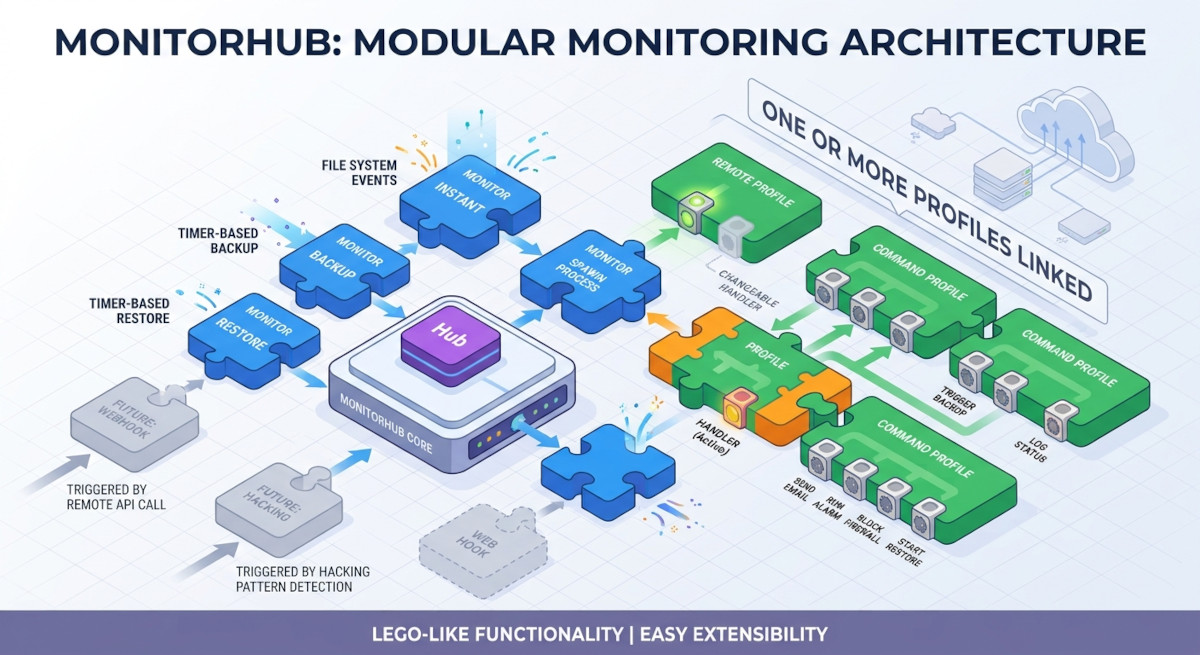
MonitorHub is a lightweight, cross-platform (Windows and Linux) file and folder monitor. It reacts to file system events and timer events, automatically propagates files to a target destination — a cloud storage provider, an FTP server, a local drive or a shared folder — and can run commands and scripts in response to events.
It is configured from a single command-line interface, mhub, or from a web GUI
(mhub-gui) when you prefer a browser to a terminal.
How it works
MonitorHub is a lego box with two kinds of bricks:
- Monitors consume events. A monitor watches a folder for changes (file system events) or runs on a schedule (timer events) and turns every event into an action. Each monitor runs as its own process, so monitors are isolated from each other.
- Profiles do the work. A profile holds the configuration of a handler, and one or more profiles are attached to a monitor.
When a monitor picks up an event — created, modified, deleted, moved,
closed or timer — it hands the event to an event dispatcher. The dispatcher
queues it and detaches it to the handlers of every attached profile. Each
handler runs on its own worker thread, so a slow upload or a long-running command
never blocks other events.
Monitor types available today:
| Monitor | What it does |
|---|---|
| Instant monitor | Watches a folder and uploads every changed file to the destination immediately. |
| Backup monitor | Copies the local folder to the destination on a schedule. |
| Restore monitor | Copies the destination back to a local folder on a schedule. |
Profile types available today:
| Profile | What it does |
|---|---|
| Remote profile | Copies files to a cloud storage provider, FTP/SFTP server, WebDAV server or local folder. S3-compatible storage uses the built-in handler; everything else is delegated to rclone. |
| Command profile | Runs a shell command or script in response to events. |
Profiles, monitors and their mapping are stored in a local SQLite database,
managed with mhub database, mhub profile and mhub monitor.
Where to go next
| I want to | Start here |
|---|---|
| Install the binaries | Install on Windows or Install on Linux |
| Run from a source checkout | Run from source |
| Info about the Web GUI | Web GUI |
| Create my first monitor | Your first monitor |
| Configure cloud storage | Remote profiles |
| Run a command on an event | Command profiles |
| Look up a command or flag | Command-line interface |